Mobile
Play Blackjack on Your Phone: Free, in the Browser, No App to Install
Search an app store for "free blackjack" and you'll find hundreds of apps, most of them asking for storage, permissions, and sooner or later your money. You don't need any of them. BlackJack Streak runs in the browser your phone already has: open BlackJackStreak.com and you're at the table, with Frank dealing and the Hit and Stand buttons right under your thumb.
You don't need a blackjack app
A blackjack app has to be found, downloaded, updated, and given room on your phone. Many of the free ones make their money from ads between hands or from selling coin packs once your balance runs low. That's the business model, and it shapes the game: the pressure to buy is part of the design.
BlackJack Streak is a website, so there's nothing to install and nothing to update. Every visit gets the latest version automatically. It has no ads, no tracking, and nothing for sale: chips are free and always will be. You start with 500,000 of them.
From lock screen to first hand in about thirty seconds
- Open your browser (Safari on iPhone, Chrome or any other browser on Android) and go to BlackJackStreak.com.
- Wait a moment while the studio loads. The whole game is under 2 MB, about the size of one photo.
- Tap a chip along the bottom of the screen to bet it.
- Tap Deal. Frank deals the cards.
- Hit, Stand, Double, Split or Surrender with the buttons under the table. They light up gold when the decision is yours.
New to the game? Our guide to how to play blackjack covers the rules in ten minutes, and you can follow along on the same phone.
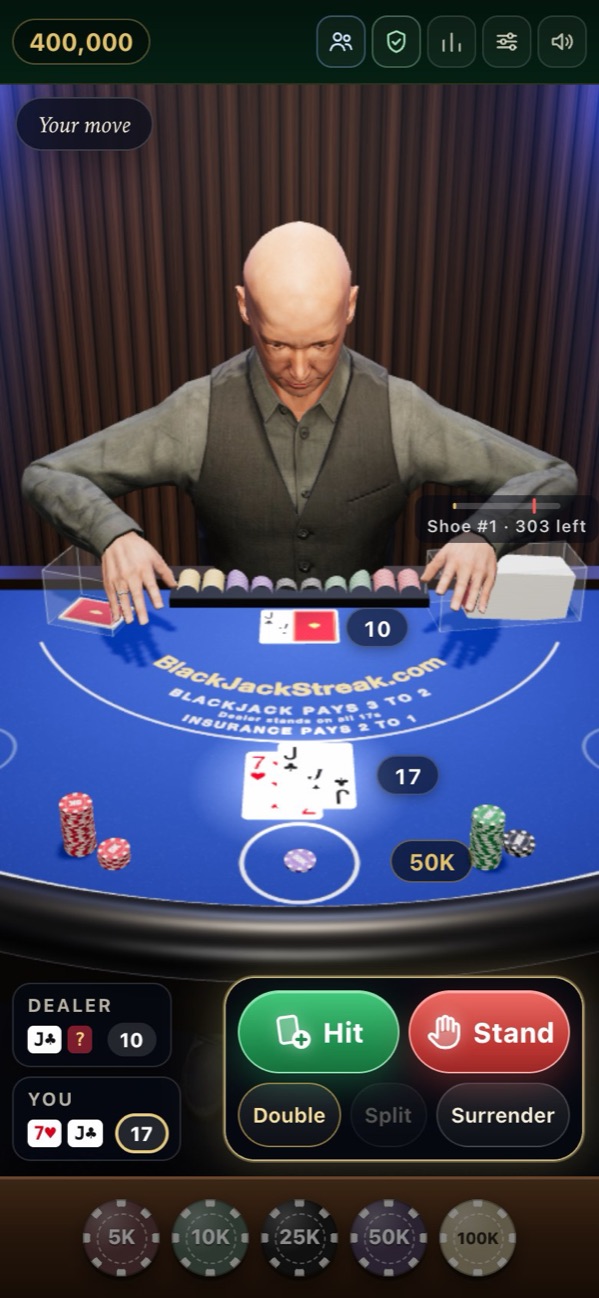
Built for one thumb
A blackjack table is wide and a phone is tall, so BlackJack Streak rearranges itself on a small screen instead of shrinking the desktop version:
- The buttons move under the table. On a computer they float beside your chips. On a phone they sit at the bottom, where your thumb already is.
- Your totals are spelled out. Small panels show your hand and Frank's hand with their totals, so you never have to squint at a card.
- The cards are big. BlackJack Streak uses jumbo-index cards, the kind live-dealer tables use: a large rank and suit in the corner, full-strength red and black on bright white. They stay readable even on a small screen.
- Frank stays in the shot. The 3D studio sits at the top, so you still watch him deal, flip and pay.
Light on data, smooth on older phones
A lot of mobile games are hundreds of megabytes. BlackJack Streak's first visit downloads under 2 MB, including Frank, the studio and the cards. After that, your phone keeps the files: they're marked so browsers can hold onto them, which means a return visit downloads almost nothing until we ship an update.
The 3D studio also watches how your phone is coping. If frames start arriving late, it lowers the drawing resolution a step at a time until the motion is smooth again. On an older phone the picture gets a little softer, but the cards still glide instead of stuttering. Playing on the bus? Settings lets you turn off the lounge music and sound effects, and pick a Fast deal speed when you want hands to move quickly.
Put BlackJack Streak on your home screen
You can have an icon on your home screen without an app:
- iPhone and iPad (Safari): open BlackJackStreak.com, tap the Share button, then Add to Home Screen.
- Android (Chrome): open BlackJackStreak.com, tap the menu (the three dots), then Add to Home screen.
Next time, one tap takes you straight back to the table.
Good to know
On iPhones and iPads, a web page is only allowed to speak after you have tapped it. If Frank is quiet when the table first loads, tap anywhere on the table and his voice comes in from there. You can also switch his voice off and turn captions on in Settings to read his lines instead.
Play with friends from your phone
Phones are where the invites happen, so BlackJack Streak makes them easy. Tap Friends, then Start a table, and you get a link like blackjackstreak.com/t/K7Q2XM. On phones that support it, a Share button sends it straight to your messages or group chat. Up to four friends can join from their own phones, tablets or laptops, and everyone plays their own chips against Frank from one shoe.
A few things are tuned for mobile life:
- Every hand is listed. On a narrow screen the far seats are off to the side, so the side panel lists every player's hand for you.
- Answering a message won't lose your seat. If your connection drops or you switch apps, your seat is kept for two minutes. If it's your turn, Frank stands for you after 8 seconds so the others aren't stuck, and you're put straight back at the table when you return, even mid-round.
- Slow phones don't cost anyone time. Each player's 20-second decision clock only starts once their own screen has finished dealing the cards.
Read the full rundown in play blackjack with friends.
A free account keeps your phone and computer in step
You can play BlackJack Streak as a guest, without signing up. A free account adds a few things that matter if you switch devices: your chips, stats, badges and every hand you've played are saved and follow you to any phone or computer, and you can top your chips back up to 500,000 whenever you run low. Signing in takes an email address and nothing else, no password. Accounts are for players 18 and over.
Mobile app or BlackJack Streak in the browser?
| A typical free blackjack app | BlackJack Streak | |
|---|---|---|
| Install | From an app store, with updates | None: open the website |
| Size | Varies, often much larger | Under 2 MB |
| Ads | Common | None |
| Buying chips | Often the business model | Never: chips are free |
| Checking the shuffle | Usually not possible | Every shoe can be checked in the Fair shuffle panel |
| Friends at your table | Varies | Up to four, by link |
| Works on | The platform it was built for | iPhone, Android, tablets and computers |
If you want to know how the shuffle check works, our page on provably fair blackjack explains it, and the best free blackjack sites compares the wider field.
And when you're back at a computer
The same table works on a laptop or desktop, with keyboard shortcuts: 1 to 5 for chips, Space to deal, and H, S, D, P, R to hit, stand, double, split and surrender. Sign in on both and your chips are waiting wherever you sit down.
Questions people ask
Is there a BlackJack Streak app?
You do not need one. BlackJack Streak runs in your phone's browser at BlackJackStreak.com, and you can add it to your home screen from the browser's share menu so it opens with one tap, like an app.
Can I play blackjack on my phone for free?
Yes. BlackJack Streak is free on any phone: you start with 500,000 play chips, there are no ads, nothing to buy, and no real money involved.
Does BlackJack Streak work on iPhone and Android?
Yes. It works in the browsers on iPhone, iPad and Android phones and tablets, as well as on computers. On a phone the buttons move under the table where your thumb is.
How much data does mobile blackjack use?
BlackJack Streak downloads under 2 MB on your first visit, including the 3D dealer and studio. Your phone keeps those files, so later visits use very little data.
Why can't I hear the dealer on my iPhone?
iPhones only let a web page speak after you tap it, so tap the table once and Frank's voice starts. Also check that Sound and Frank's voice are on in Settings.